더보기
동영상은 background속성으로 제어할 수 없고, 비디오 태그가 있어야한다.
비디오태그랑 아래 div 겹쳐야할경우
메인비쥬얼 섹션에 position: relative !
absolute는 무조건 상위 요소의 0점을 찾아간다.
static은 좌표를 인식할 수 없는 기본상태, 자식들한테 position을 줬을 때 부모를 기준으로 움직일 수 없다.
보통 부모태그한테 relative를 주고 자식요소한테 absolute를 준다.
video태그랑 div태그 모두 absolute 줬을 때 섹션 태그의 0점에 온다.
div text는 앞에, video는 뒤에 위치한다.
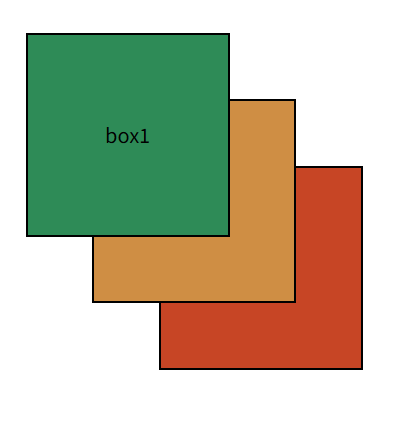
z-index속성 position이 적용된 박스끼리 겹쳐 있을 경우 어떤 태그가 더 앞에 나올지 결정하는 속성
z-index속성은 값으로 단위 없이 숫자를 사용 하며 숫자가 클수록 앞으로 위치한다.
쓸 수 있는 값은 0~9999까지 쓸 수 있고 기본값은 0이다.
하지만 9999와 같은 너무 높은 숫자는 브라우저가 인식하지 못하고 오류를 일으킬 때가 있어 100단위 숫자를 주로 많이 사용한다.
< title > z-index </ title >
< style >
* {
margin : 0 ;
padding : 0 ;
}
div {
width : 300px ;
height : 300px ;
border : 4px solid #000;
text-align : center;
font-size : 30px ;
line-height : 300px ;
position : absolute; /* 절대좌표, 브라우저 0점으로 박스들 모두 겹쳐짐. */
}
div:nth-child ( 1 ) {
background-color : seagreen;
top : 100px ;
left : 100px ;
z-index : 9 ;
}
div:nth-child ( 2 ) {
background-color : rgb( 207 , 142 , 68 );
top : 200px ;
left : 200px ;
z-index : 3 ; /* 음수값을 쓰지 않고, 0이 기준이다. 숫자가 클수록 맨 앞으로 나온다. order속성과 비슷. 겹쳐져 있는 박스가 별로 없을 때 너무 높은 숫자 쓸 필요 없다. header는 늘 맨 앞으로 나와야하기 때문에 큰 수 3자리를 준다. ex) z-index:999;*/
}
div:nth-child ( 3 ) {
background-color : rgb( 199 , 69 , 37 );
top : 300px ;
left : 300px ;
}
</ style >
</ head >
< body >
<!-- z-index속성 -->
< div > box1 </ div >
< div > box2 </ div >
< div > box3 </ div >
</ body >
</ html >
더보기
.con 이 좌표를 인식하고 있어야한다. nav 태그에 absolute를 주면 상위부모인 con의 0점으로 간다.
좌표가 지정되어있으면 마진을 줄 수 있다.
왼쪽으로 nav의 반만큼 다시 끌어당긴다. absolute자식들은 해당 태그를 기준으로 움직인다.
섹션 박스는 relative
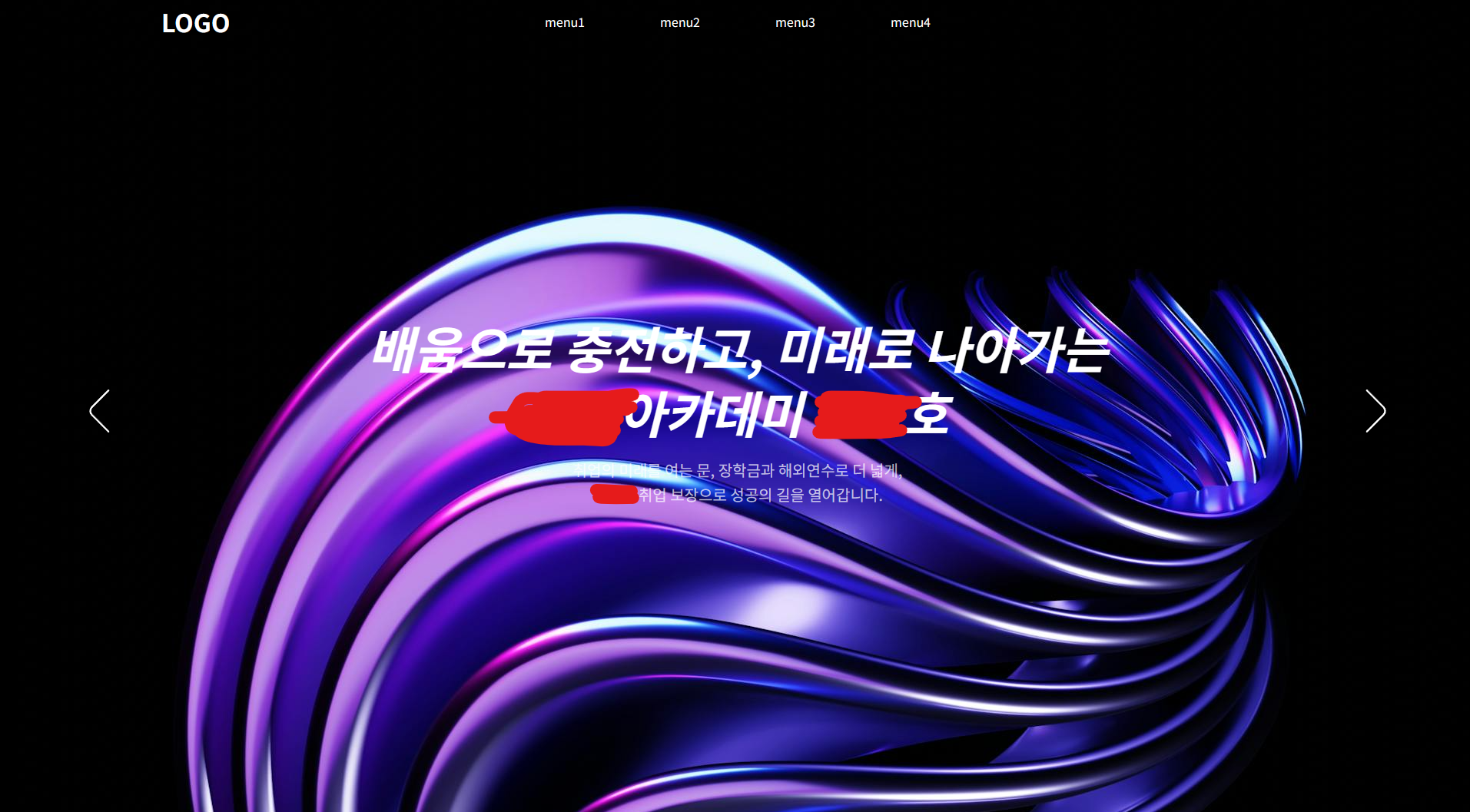
이미지, 텍스트박스, 양쪽 화살표 모두 absolute상태여야한다.
gnb가 400px인데 left좌표를 부모의 반 50%만큼 일단 먼저 보낸다.
요소의 중앙과 부모박스의 반이 맞으면 중앙이 되므로, gnb200px만큼 다시 끌어당긴다.
밑줄에다가 left를 또 쓰면 위에 적용한 50%가 취소되므로,
margin-left 음수값을 사용해서 끌어당긴다. -200px만큼 해주면
margin-left쓰는 skill이 범용적이다. calc()함수 쓰는 방법도 있지만 gnb 크기가 달라지면 다시 계산해줘야하므로.
< title > 메인비주얼 모양 만들기 </ title >
< style >
* {
margin : 0 ;
padding : 0 ;
}
a {
text-decoration : none;
color : #fff;
}
ul ,
li {
list-style : none;
}
img {
border : none;
display : block;
}
.container {
width : 100% ;
height : auto;
}
header {
width : 100% ;
height : 60px ;
position : absolute;
top : 0 ;
left : 0 ;
z-index : 999 ;
}
header .con {
width : 1500px ;
height : 100% ;
margin : 0 auto;
display : flex;
align-items : center;
position : relative; /* 상대좌표 */
}
nav {
width : 600px ;
height : fit-content;
position : absolute;
left : 50% ;
/* 왼쪽으로 nav의 반만큼 다시 끌어당김 */
margin-left : -300px ;
}
nav > ul {
width : 100% ;
display : flex;
text-align : center;
color : #fff;
}
nav > ul > li {
width : 25% ;
}
/* 컨텐츠 영역 */
main {
position : relative;
top : 0 ;
}
/* 메인비주얼 */
.visual {
width : 100% ;
height : 100vh ;
overflow : hidden;
position : relative; /* 상대좌표. absolute 자식들은 해당 태그를 기준으로 움직임 */
}
.visual_img {
width : 100% ;
height : 100% ;
position : absolute; /* 부모의 0점을 기준으로 이동 */
top : 0 ;
left : 0 ;
}
.visual_img > img {
max-width : 100% ;
}
/* 비주얼 텍스트 */
.visual_text {
width : 1000px ;
height : 250px ;
position : absolute;
color : #fff;
left : 50% ;
top : 50% ;
margin-left : -500px ;
margin-top : -125px ;
text-align : center;
display : flex;
flex-direction : column;
justify-content : space-between;
}
.visual_text h2 {
font-size : 65px ;
line-height : 1.3 ;
font-style : italic;
}
.visual_text p {
font-size : 20px ;
line-height : 1.6 ;
color : rgba( 255 , 255 , 255 , 0.7 );
}
.arrow_left ,
.arrow_right {
position : absolute;
width : 56px ;
height : 56px ;
}
:is ( .arrow_left , .arrow_right ) > img {
max-width : 100% ;
filter : invert( 1 );
}
.arrow_left {
/* 좌표 */
left : 100px ;
top : 50% ;
margin-top : -28px ;
}
.arrow_right {
transform : rotate( 180deg );
/* 좌표 */
right : 100px ;
top : 50% ;
margin-top : -28px ;
}
</ style >
</ head >
< body >
< div class = "container" >
< header >
< div class = "con" >
< h1 >
< a href = "#" > LOGO </ a >
</ h1 >
< nav >
< ul >
< li > menu1 </ li >
< li > menu2 </ li >
< li > menu3 </ li >
< li > menu4 </ li >
</ ul >
</ nav >
</ div >
</ header >
< main >
< section class = "visual" >
<!-- 비주얼 이미지 -->
< div class = "visual_img" >
< img src = "./img/main_visual_img.jpg" alt = "메인비주얼" />
</ div >
<!-- 비주얼 텍스트 -->
< div class = "visual_text" >
< h2 > 배움으로 충전하고, 미래로 나아가는 < br /> 이젠아카데미 502호 </ h2 >
< p >
취업의 미래를 여는 문, 장학금과 해외연수로 더 넓게, < br />
경기도 취업 보장으로 성공의 길을 열어갑니다.
</ p >
</ div >
<!-- 화살표 -->
< div class = "arrow_left" >
< img src = "./img/angle-left.svg" alt = "prev" />
</ div >
< div class = "arrow_right" >
< img src = "./img/angle-left.svg" alt = "next" />
</ div >
</ section >
</ main >
</ div >
</ body >
</ html >